
Safety register software: 6 tools compared in 2026
Looking for safety register software for your sites? I compared six tools, all focused on property safety: CountAct, BatiFire, Deemply, Gammeo, Ap’Secure and EgidX. Public prices, features and exit terms were checked on November 19, 2026, on each vendor’s website.
How I compared
I am Tom Basin and I work at CountAct, which makes CompliAssist. I say it upfront: this ranking is written by a vendor. To keep it verifiable, every competitor price and feature links to its source, listed at the bottom of the page.
On November 19, 2026, I read the pricing pages, product pages and, where public, the terms of the five other vendors. Anything not shown on their site is written “not shown on its website”. I did not test any competitor account: I compare what each vendor publishes.
My view, after years in risk prevention: a safety register is not there to archive PDFs. It is there to tell you, at any time, which site is ready for the safety commission. That is how I rank the tools.
What safety register software must do
The register’s content is set by regulation, as detailed in our article on the mandatory content of an ERP safety register. On top of that, software should save you time on five criteria:
- Register and inspections: each installation, its frequency, its last inspection and next due date, with a reminder before it.
- Clearing findings: each observation in a report becomes an action, with an owner, a due date and proof it was cleared.
- Commission preparation: an up-to-date file produced in minutes, not two days gathering documents.
- Multi-site: one register per establishment, plus an overview showing which site is slipping.
- Price and exit: a clear price, and your data returned at the end of the contract in an open format.
The 6 safety register tools in one table
Price and best fit
Public prices checked on November 19, 2026 on each vendor’s website.
| Price | Best for | |
|---|---|---|
| 1. CountAct (CompliAssist) | Per plan, from 1 to 5 establishments; custom quote beyond | Knowing at any time which site is ready for the commission, across a portfolio |
| 2. BatiFire | Free Secours module; Start from €7.60 excl. VAT per month per public building, 48-month commitment, without AI | Tracking many specialised registers: asbestos, water safety log, ICPE, APSAD |
| 3. Deemply | Free for 1 building and 1 module; Professional from €490 excl. VAT per year; custom quote above 20 buildings | Starting free on one building |
| 4. Gammeo | Custom quote based on floor area; not shown on its website | A full building CMMS, with register and water safety log |
| 5. Ap’Secure | From €99 excl. VAT per month, setup and support included | A single establishment that wants guided setup |
| 6. EgidX | €99.90 excl. VAT per month per supervisor, plus hosting and 20% support | Field rounds without network and a security logbook |
1. CountAct (CompliAssist): ready for every commission, on every site
CompliAssist, CountAct’s property safety app, keeps the digital safety register, tracks periodic inspections and records how each finding is cleared. Its difference fits in one number: the ScoreRisk. It is a compliance score per establishment, updated with every inspection and due date, viewable by region, brand or subsidiary.
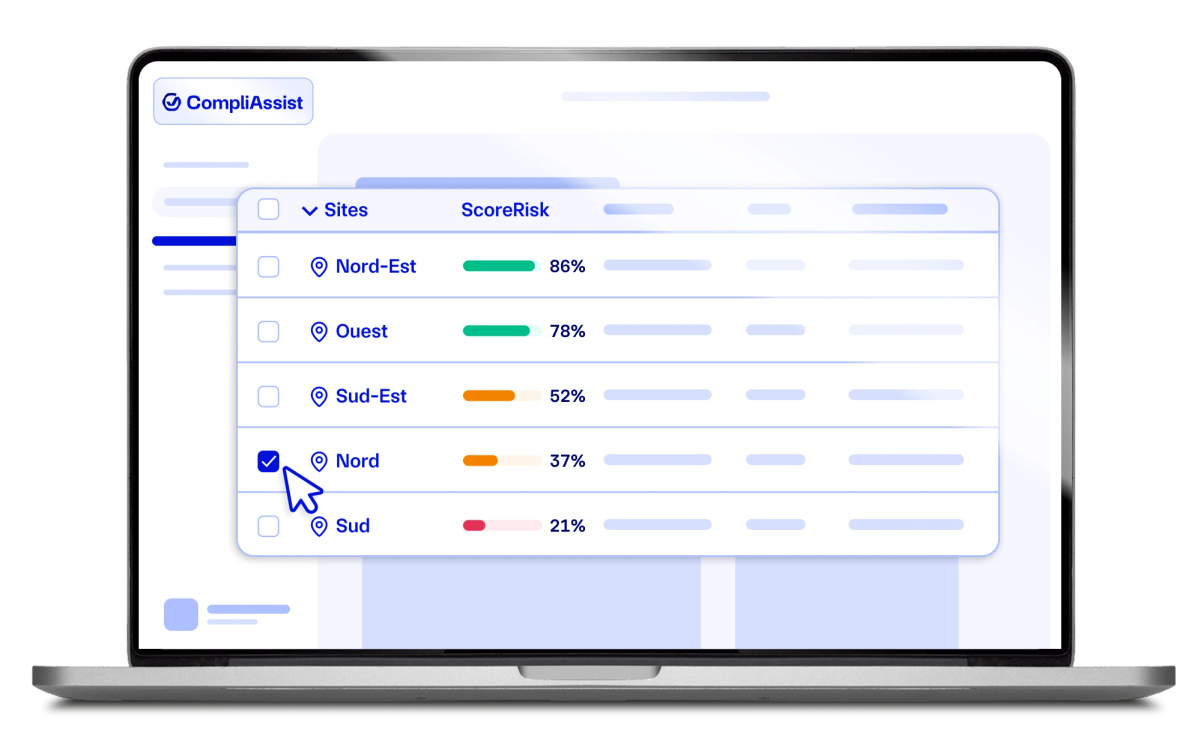
On inspection day, the complete compliance file is generated in 5 minutes instead of 2 days. Regulatory AI is included in every plan, with continuous regulatory monitoring. Automatic reminders are included from the Pilote plan. A user is up and running in under 10 minutes on average.
- Price: three plans, Simple (1 establishment), Pilote (up to 3) and Maître (up to 5); custom quote beyond. 30-day free trial.
- Exit: at the end of the contract, your data is returned on request made within 30 days, as CSV, JSON or PDF (terms of use, art. 14). The terms mention no fees.
- Optional modules: risk assessment (DUERP), hot work permits, work order tracking, rounds, audits, training.
What CountAct does not do: no asbestos, accessibility, water safety log or ICPE register for now, and the prevention plan is coming soon. The multi-site portfolio view and contractor access are reserved for the Maître plan.
For people safety, the same platform handles alerts, zone-by-zone evacuation and headcount, built with firefighters and police. That is outside the scope of this comparison.
“With CountAct, I feel ready for any audit or inspection. Everything is centralised, traced and searchable. I finally manage all my risk and safety topics instead of enduring them.” Director of a SEVESO industrial site

Get ready for your next commission with CompliAssist
Register, inspections, findings and ScoreRisk on one screen. 30-day free trial.
2. BatiFire: for tracking many specialised registers
BatiFire offers four plans. The Secours module is free: it lists information useful to emergency services and the assets to protect first. Start begins at €7.60 excl. VAT per month per public building, Optimisée at €9.30 and Premium at €13.50, all with a 48-month commitment and without AI.
- Strengths: unlimited users on every plan, and a wide choice of registers (asbestos, water safety log, APSAD, accessibility, ICPE, playgrounds).
- Good to know: AI to import reports and minutes is an option; Start gives access to one register of your choice, Premium to all 14 modules.
Choose it if you need asbestos, water safety or an ICPE site in the same tool.
3. Deemply: for starting free on one building
Deemply covers the safety register and eight other modules, including risk assessment, hot work permits and the water safety log. For the commission, it generates a clickable PDF summary of all sites; the requirements in the minutes become work orders to schedule. Contractors sign the register from their own app.
- Price: Découverte plan free with no time limit, for 1 building and the register module only (1 user, 1 observation). Professional from €490 excl. VAT per year, depending on buildings and modules. Custom quote above 20 buildings.
- Good to know: history import and training are priced separately; the “Connexions prestataires +5” option (extra contractor connections) is listed in the custom plan.
- Exit: its terms state that a data export provided by the vendor after the contract ends costs a flat €500 excl. VAT, on request within 15 days.
Choose it to try a first building with no budget.
4. Gammeo: for a full building CMMS
Gammeo is first a CMMS: preventive and corrective maintenance, contracts, leases, training, contractors. The safety register and water safety log are digital and can be shared as a PDF “in 15 seconds” before a pre-commission visit. Dashboards surface the findings to clear.
- Strengths: no user restrictions, data hosted in France, setup handled by the Gammeo team.
- Good to know: price on quote, based on floor area; setup takes 2.5 days per building on average; access “as long as you have an internet connection”.
Choose it if you also want a CMMS for the whole building, not only safety.
5. Ap’Secure: for a guided single establishment
Ap’Secure keeps a digital safety register with electronic signature. The latest inspections entered are used to prepare the next due dates in an action plan. Risk assessment, school safety plan (PPMS), document management and works modules complete the offer.
- Price: from €99 excl. VAT per month, depending on the size of the establishment; the offer is defined with the team after a demo.
- Included: installation and licence, updates, hosting, guided setup and support. Unlimited buildings within one establishment.
Choose it for a single establishment that wants support included in the price.
6. EgidX: for field rounds without network
EgidX combines a digital safety register, an electronic security logbook, rounds and anomaly management. For the commission, it generates a site summary with inspection reports, minutes, due dates and findings to clear. Rounds run on mobile, even offline.
- Price (terms of sale): supervisor licence at €99.90 excl. VAT per month per user, agent licence at €9.90, plus hosting, plus support equal to 20% of the total.
- Good to know: the price follows the number of users, not sites; include hosting and support in your budget.
Choose it if your security teams patrol areas without network.
Which tool to choose for your situation
- You want to know at any time which site is ready for the commission: CountAct.
- You manage 2 to 5 establishments and want a compliance file ready in 5 minutes: CountAct.
- You want to try free on a single building: Deemply.
- You must track asbestos, water safety or an ICPE site: BatiFire.
- You want a CMMS for the whole building: Gammeo.
- You have one establishment and want guided setup: Ap’Secure.
- Your rounds often happen without network: EgidX.
Before choosing, check what changes with your ERP category and how the safety commission visit works.
Paper, spreadsheet or software?
Paper remains legal: no rule imposes a medium. But it reminds no one and can only be read in the plant room. A spreadsheet works for one site, then every establishment ends up with its own format.
- Paper: free, but no alerts and no overview.
- Spreadsheet: flexible, but no proof of clearance and no reliable reminders.
- Software: reminders, traced findings, generated commission file.
Beyond a few sites the gap becomes clear: see why spreadsheets stop scaling across sites.
Software consolidates tracking across your sites, but each ERP keeps its own register, to be shown during commission visits.
Where does your establishment stand?
Take stock in a few minutes with CountAct’s free compliance audit.
Sources & references
- BatiFire pricing — BatiFire, relevé du 19 novembre 2026
- BatiFire modules list — BatiFire, relevé du 19 novembre 2026
- Deemply pricing — Deemply, relevé du 19 novembre 2026
- Deemply safety register module — Deemply, relevé du 19 novembre 2026
- Deemply terms of sale — Deemply, relevé du 19 novembre 2026
- Gammeo FAQ — Gammeo, relevé du 19 novembre 2026
- Gammeo safety register and water safety log — Gammeo, relevé du 19 novembre 2026
- Ap’Secure pricing — Ap’Secure, relevé du 19 novembre 2026
- Ap’Secure safety register module — Ap’Secure, relevé du 19 novembre 2026
- EgidX home page — EgidX, relevé du 19 novembre 2026
- EgidX digital registers — EgidX, relevé du 19 novembre 2026
- EgidX terms of sale, art. 4 — EgidX, relevé du 19 novembre 2026
- Article R143-44, French Building and Housing Code — Légifrance
- 2002 central safety commission opinion on digital registers, cited by Daftar — Daftar, relevé du 19 novembre 2026
Frequently asked questions
Tom BasinStrategic Partnerships Manager
Holding a Master's degree in risk prevention, Tom Basin serves as Partnerships Manager at CountAct, contributing to the development and rollout of the first turnkey crisis management support solution, with the aim of putting security back at the heart of businesses. His experience, along with his training at the Master's level and at the Institut national des hautes études de la sécurité et de la justice, gives him a broad perspective on security and crisis management.